


Contents
- Why choose Artificial Intelligence for textile personalisation?
- How to use the AI option to create your custom design on Tissus Print
- Conclusion
- Bonus: FAQ on using the AI tool
Textile personalisation has become an essential way to express creativity—whether you’re designing one-of-a-kind clothing, standout accessories, or fulfilling the specific needs of artistic or commercial projects. At Tissus Print, we provide a game-changing tool that integrates Artificial Intelligence (AI), enabling you to create truly impressive, made-to-measure AI textile personalisation designs.
Why choose Artificial Intelligence for textile personalisation?
The introduction of Artificial Intelligence into textile personalisation has been a major turning point for creators. AI simplifies the design process while unlocking an endless range of creative possibilities. With Tissus Print’s AI textile personalisation tool, even those who aren’t professional artists or graphic designers can create designs that look truly high-end.
Benefits of AI textile personalisation:
- Speed: Creating custom patterns with AI is almost instant—generate a design from a simple text description in seconds.
- Originality: AI can produce unique, original visuals tailored to your taste and your project needs.
- Accessibility: Whether you’re a beginner or an expert, our tool is intuitive and easy to use, delivering excellent results every time.
Graphic styles available in Tissus Print’s AI personalisation tool
Our AI textile personalisation tool, designed specifically for textile printing (fabric AI tool), offers a range of graphic styles to suit every creative direction:
- "Style": Create patterns based on popular aesthetics such as vintage, modern or minimalism—ideal for AI personalised clothing with a refined, wearable look.
- "Art": Add an artistic edge with visuals inspired by movements like abstract art or impressionism—perfect when originality is the priority.
- "Trending": Stay ahead of the curve with contemporary patterns that capture today’s styles—great for personalised clothing and accessories aligned with current fashion.
- "Photography": Bring realistic photographic elements into your design—ideal for projects that require detail, depth and a natural finish.
Quick guide: Which AI graphic style should you choose for your project?
| Goal | Recommended AI style | Example products | Prompt tips (English) | Key watch-outs |
|---|---|---|---|---|
| Create a trend-led pattern for a collection | Trending | T-shirts, sweatshirts, accessories | “trendy graphic, clean lines, bold shapes, high contrast” | Avoid unreadable text and overly fine details. |
| Create an artistic ‘signature’ piece | Art | Textile posters, scarves, décor | “abstract composition, painterly texture, soft gradients” | Be careful with gradients on small formats (legibility). |
| Achieve an elegant, easy-to-wear look | Style | Shirts, dresses, accessories | “minimalist pattern, muted colors, balanced spacing” | Specify palette/colours to avoid an overly busy result. |
| Create a realistic result with precise details | Photography | Cushions, panels, wall décor | “realistic photo style, sharp focus, natural lighting” | Check resolution and preview rendering before printing. |
| Create a repeatable all-over pattern | Style or Art | Fabric by the metre, curtains, home textiles | “seamless pattern, repeating motif, balanced repeat” | Review the repeat/tiling before printing. |
| Quickly test multiple creative directions | Any (depending on need) | Prototypes, small runs | “generate 3 variations, same palette, different composition” | Standardise palette + style to maintain brand consistency. |
Example project:
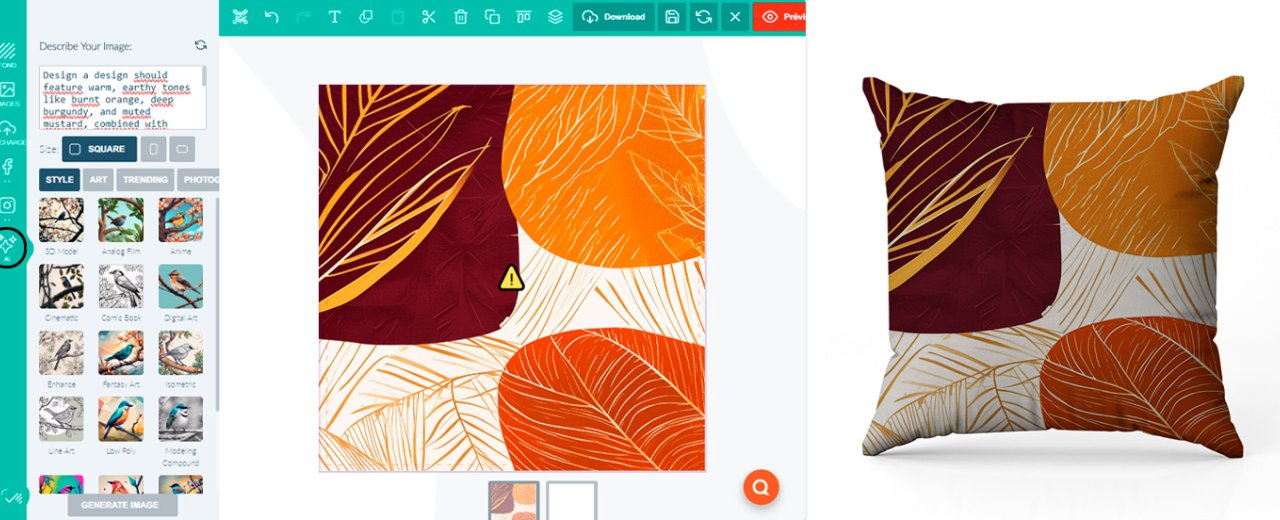
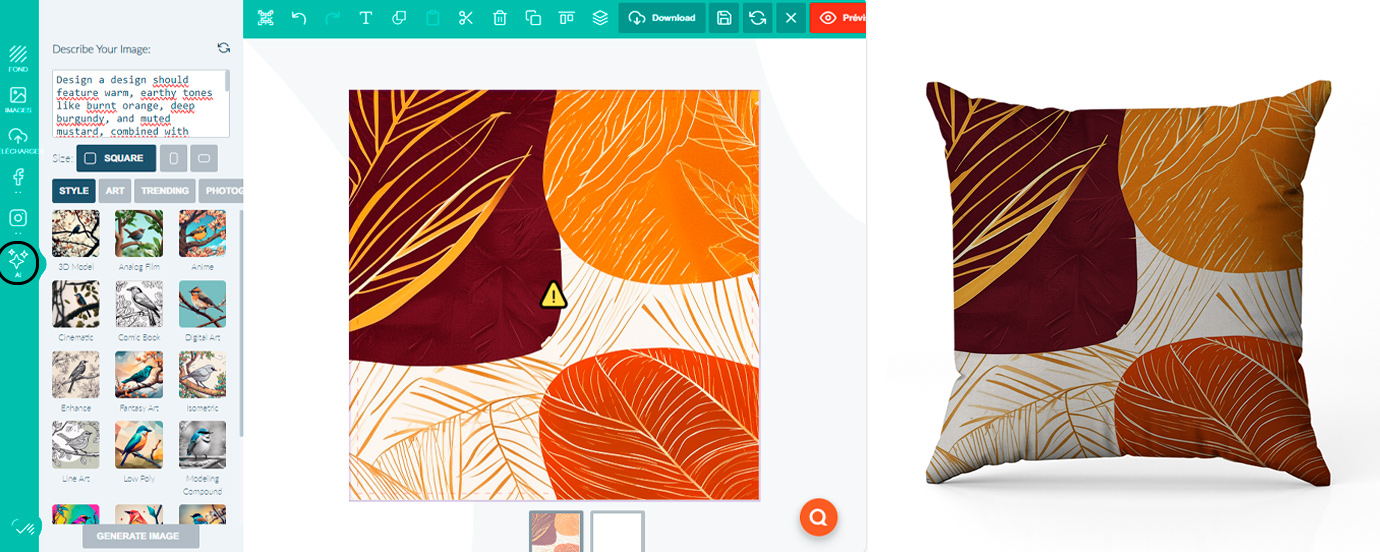
Imagine you want to create a unique design for your cushion using Tissus Print’s AI tool. Follow these simple steps to get a great result:
- Open the product page for your Tissus Print cushion cover: Visit our website and select the cushion cover you want to personalise.
- Click “Personalisation”: On the product page, click the “Personalisation” button to access the design options.
- Use the AI tool: In the bottom-left corner of the personalisation window, click the AI icon to launch our smart tool.
- Ask ChatGPT to generate a prompt: For example, ask ChatGPT to help you write the best English prompt for a trendy autumn-toned cushion design. Here is the prompt we got:
"Design a design should feature warm, earthy tones like burnt orange, deep burgundy, and muted mustard, combined with abstract leaf patterns and organic shapes. Incorporate elements of cozy textures such as knitted patterns or subtle plaid, with a hint of metallic accents in copper or gold. The overall style should be modern yet inviting, capturing the essence of autumn with a contemporary twist." - Generate your design: Copy and paste the prompt into our AI tool, click “Generate”, and let AI do the work.
- Review the result: Once generated, you can preview how it will look on your cushion once printed. If you’re happy, all that’s left is to place your order.
How to use the AI option to create your custom design on Tissus Print
AI textile personalisation has never been easier thanks to our built-in tool. Here’s how it works:
- Step 1: Write a sentence in English: To generate a design that matches your expectations, write a clear English description. For example: “abstract floral pattern with vibrant colors”.
- Step 2: Choose a graphic style: Select the category best suited to your project: “Style”, “Art”, “Trending” or “Photography”.
- Step 3: Preview and refine: Before placing your order, preview the generated design and adjust it until it matches your vision.
- Step 4: Print on your chosen textile: Once approved, select the textile you want to print on. We offer a wide range of fabrics—from organic cotton for AI personalised t-shirts to silk for more premium creations.
Online alternatives for creating AI patterns
While our AI textile personalisation tool is designed specifically for textile printing, other online platforms can also help you create unique AI-generated visuals:
- DALL·E: A powerful tool for generating images from text descriptions—ideal for original artistic creations.
- Midjourney: Known for complex, artistic visuals generated from prompts—great for projects that need a distinctive creative style.
- DeepArt: Applies artistic styles to your images, creating highly original visuals and patterns.
What sets Tissus Print apart is the direct integration of our AI tool into the textile printing process—providing a complete solution from creation to production.
Long-term benefits of AI-powered textile personalisation
Using AI for textile personalisation brings several lasting advantages:
- Unlimited creativity: Refresh your designs as often as you like with virtually no creative limits.
- Time savings: Automating the design phase dramatically reduces the time from idea to production.
- Trend responsiveness: With our AI tool, you can explore and incorporate market trends quickly, keeping your designs modern and relevant.
Testimonials & case study: creating a custom AI image with Bypopo
A concrete example of what our AI tool can achieve is showcased in the case study “Creating a custom image with AI” by Bypopo. In this article, Bypopo explains how they used our tool to turn a simple idea into a unique textile creation, step by step—showing how Tissus Print’s AI helped bring an artistic vision to life on AI personalised clothing.
You can read the full case study here: Creating a custom image with AI.
Conclusion
AI textile personalisation is a powerful way to unlock limitless creativity. Whether you want to design AI t-shirts, unique accessories or AI personalised clothing, Tissus Print’s print AI tool is here to support your creative journey. Explore the possibilities of Artificial Intelligence and stand out with custom textile creations that reflect your style.
FAQ - Tissus Print AI textile personalisation tool
Why use Artificial Intelligence to create a textile pattern?
AI generates original visuals quickly from a simple description. It’s ideal for producing unique patterns, testing multiple creative directions and speeding up design—even without advanced graphic design skills.
Do I need to write my prompt in English?
Yes. For best results, your description should be written in English. If needed, you can use a translation tool (e.g., DeepL) or ask ChatGPT to craft an optimised prompt.
Which graphic styles can I generate with Tissus Print’s AI tool?
The tool offers several creative worlds, including Style (vintage, modern, minimalist), Art (abstract, impressionism, etc.), Trending (current trends) and Photography (realistic rendering).
Can I edit the design after generation?
Yes. You can preview the result, refine your composition and generate new versions before placing your order. To secure a project, you can also request a BAT (print proof).
Which products can I print my AI design on?
You can print your AI visual on a wide range of textiles and products depending on your needs: clothing, accessories, cushion covers, and various fabrics available from Tissus Print.
How is Tissus Print’s AI tool different from other platforms (DALL·E, Midjourney, etc.)?
The key difference is direct integration into the textile printing journey: you move from pattern creation to production more smoothly, with preview tools and a workflow designed specifically for textile printing.
What are the production lead times after design validation?
Lead times vary depending on the chosen product and quantities. Once your design is validated, our team starts production as quickly as possible, for both one-off orders and larger runs.
How do I get a truly effective prompt for a print-ready result?
Be specific about the subject, style, colour palette and pattern density, and avoid overly fine details if you need clear readability from a distance. Add terms like “seamless pattern” if you want an all-over repeat.
We hope this article has given you everything you need to get the most out of our AI textile personalisation tool. Discover the possibilities for yourself on our platform and start creating today.


0 commentaires